You’ve validated your product. You’re ready to scale. Now you’re staring at a decision that will quietly determine everything that comes after it do you build your eCommerce platform from scratch, or buy a ready-made solution and start selling faster?
This isn’t just a tech question. It’s a business strategy question dressed in technical clothing.
The painful truth most founders discover too late: SaaS platforms that seem affordable at $100/month become expensive constraints at $1M in annual revenue. Custom-built platforms that felt like the “right” choice at funding stage can take 12-18 months before a single order ships. Both paths have real upfront and deferred costs, and most businesses see only one side of the tradeoff until they’re already committed.
The right architecture choice resolves these tensions. A well-chosen platform gives you speed to market without locking you into someone else’s product roadmap. It gives you control over your checkout flow, your commission logic, and your vendor onboarding without requiring a 6-person engineering team to maintain it.
This guide walks you through the real decision framework: what each approach actually costs, where each breaks down, and how growing businesses are finding a middle path that sidesteps the false choice entirely.
What Is an eCommerce Platform?
An eCommerce platform is the underlying software that runs a business’s online sales operations, everything from displaying products and processing payments to managing orders, customers, and inventory. It’s the system that sits behind the storefront a customer sees.
At a functional level, most eCommerce platforms handle:
- Catalog management: organizing products, categories, pricing, and variants
- Cart and checkout: letting customers add items and complete a purchase
- Payment processing: connecting to payment gateways and handling transactions securely
- Order management: tracking orders from placement through fulfillment
- Customer accounts: storing profiles, order history, and preferences
- Search and navigation: helping customers find products
- Promotions and pricing rules: discounts, coupons, tiered or contract pricing
- Integrations: connecting to ERP, CRM, PIM, tax, shipping, and marketing systems
- Admin and merchandising tools: letting internal teams manage the store day to day
Beyond these core functions, the platform also determines how easily a business can scale, integrate with other systems, expand into new markets, and adapt as requirements change, which is exactly why the build-vs-buy decision matters as much as it does. The platform isn’t just software, and it’s the operational backbone of digital commerce.
Different Types of eCommerce Platforms
eCommerce platforms generally fall into a handful of categories, each with different implications for cost, control, and flexibility.
| Type of eCommerce Platform | What It Means | Potential Limitations | Best Suited For |
|---|---|---|---|
| B2C eCommerce Platform | Designed for businesses selling products or services directly to individual consumers. | Can require significant optimization for traffic, customer experience, and omnichannel selling | Retailers, consumer brands, and online stores |
| D2C eCommerce Platform | Enables manufacturers or brands to sell directly to consumers without relying primarily on third-party retailers or marketplaces. | Requires the brand to manage storefront, marketing, fulfillment, customer service, and technology | Consumer brands, manufacturers, and digitally native brands |
| B2B eCommerce Platform | Supports business-to-business purchasing with features such as account hierarchies, contract pricing, purchase orders, approvals, and customer-specific catalogs. | More complex configuration and integration requirements | Manufacturers, wholesalers, distributors, and enterprise sellers |
| SaaS eCommerce Platform | A cloud-hosted platform where the provider manages infrastructure, hosting, security, and platform updates. | Customization and platform control may be limited | B2C, D2C, B2B, and growing enterprises |
| Open-Source eCommerce Platform | Provides accessible source code that businesses can customize and manage according to their requirements. | Requires technical expertise, hosting, maintenance, and security management | Businesses with strong development teams and complex customization needs |
| Headless eCommerce Platform | Separates the storefront or presentation layer from the commerce backend using APIs. | Greater development, integration, testing, and maintenance requirements | Enterprises with complex digital experiences and multiple customer touchpoints |
| Composable eCommerce Platform | Combines modular commerce components that can be selected, integrated, and replaced independently. | Integration and operational complexity can increase as components are added | Large enterprises with mature technology teams and complex commerce ecosystems |
| Custom eCommerce Platform | Commerce software is developed specifically for the business and its unique requirements. | Higher development and maintenance costs, longer implementation, and greater security responsibility | Businesses with highly differentiated commerce models |
| Marketplace eCommerce Platform | Supports transactions between multiple sellers and buyers through a shared marketplace. | Complex seller, catalog, payment, order, and fulfillment management | B2B/B2C marketplaces and multi-vendor businesses |
What Is the Build vs Buy eCommerce Platform Decision?
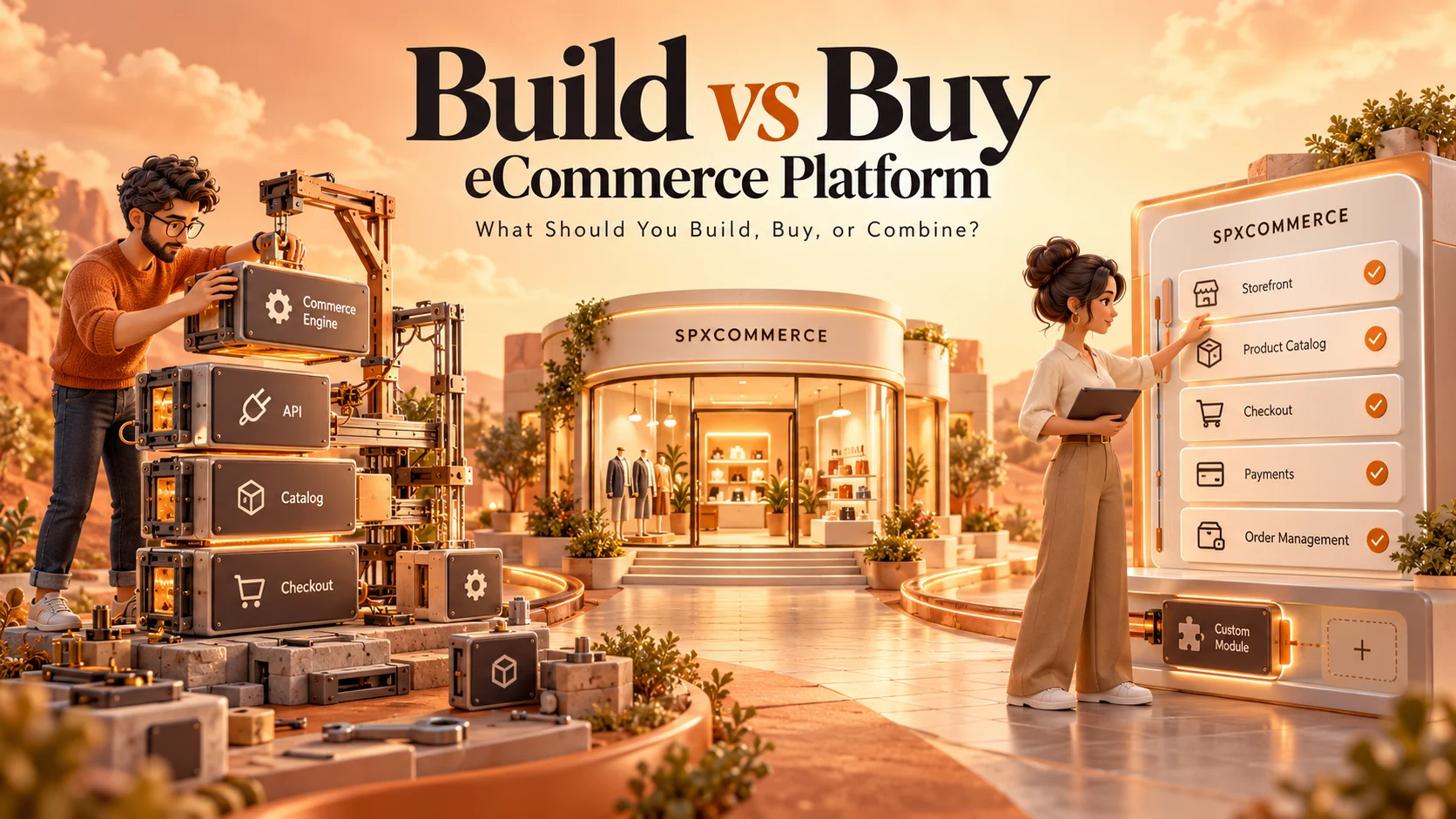
At its core, the build vs buy decision asks: should your team create proprietary commerce infrastructure, or deploy someone else’s?
Buying means adopting a SaaS platform (Shopify, BigCommerce, WooCommerce), a white-label solution, or a marketplace software package. The vendor handles hosting, security patches, core feature development, and uptime. You configure, customize within their rules, and launch.
Building means your engineering team (or an agency) designs and develops a platform specifically for your business model. You own the codebase, the architecture, the data, and every decision about what gets built next.
The catch is that most real-world decisions aren’t this binary. Businesses increasingly choose configurable platform solutions that ship with core commerce infrastructure built and tested, but leave business logic, UX, and integrations in the buyer’s hands. That middle path is where most of the interesting architecture decisions live today.
Modern eCommerce Platforms: Build vs Buy Decision
The modern eCommerce platforms build vs buy decision is no longer simply about choosing between custom development and a ready-made SaaS product. Businesses can now choose from SaaS, open-source, headless, composable, and configurable platforms, letting them decide which commerce capabilities to own and which to source.
A growing business may buy the core commerce infrastructure while building custom pricing logic, workflows, integrations, or customer experiences around it. This approach can reduce development time without forcing the business to compromise on every aspect of its commerce architecture.
The decision ultimately comes down to speed, control, cost, complexity, and long-term flexibility. The more your business depends on unique commerce processes, the more carefully you need to evaluate how much control the platform gives you before committing.
What Does the Market Actually Say?
The numbers highlight the trade-offs. Gartner (2024) reports that custom commerce platforms can take 14 months to reach production, compared with 2–3 months for SaaS deployments, while 68% of businesses building custom platforms reported scope creep as a major cost-overrun driver.
Meanwhile, Forrester (2024) found that 71% of mid-market eCommerce companies outgrow their initial SaaS platform within three years. The global eCommerce platform market was valued at $9.07 billion in 2025 and is projected to reach $16.50 billion by 2030.
The takeaway: building can delay launch, while buying can create limitations as complexity grows, making flexibility and long-term fit critical.
What Are the Key Components of Any eCommerce Platform?
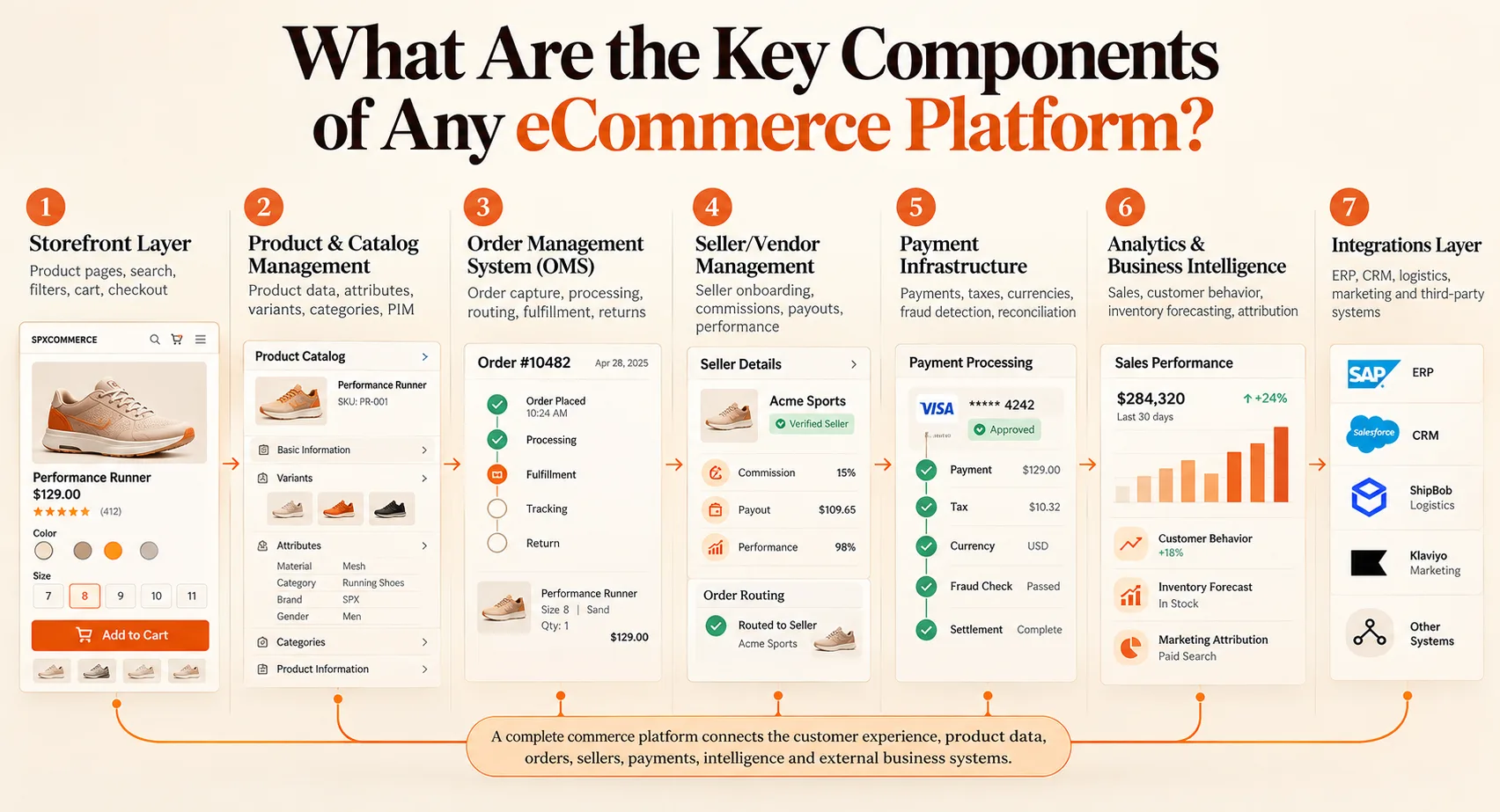
Before comparing approaches, it helps to know what you’re actually building or buying. Every commerce platform, regardless of how it’s deployed, needs to handle:
- Storefront Layer: The customer-facing UI: product pages, search, filters, cart, checkout. This is what buyers see and judge within seconds.
- Product & Catalog Management: How you create, organize, enrich, and publish product data. At scale, this becomes a full PIM (Product Information Management) requirement.
- Order Management System (OMS): The engine that handles order capture, processing, routing to fulfillment, tracking, and returns.
- Seller/Vendor Management: For marketplace models, this includes vendor onboarding, commission configuration, payout processing, and performance tracking.
- Payment Infrastructure: Gateway integrations, tax calculation, multi-currency support, fraud detection, and reconciliation.
- Analytics & Business Intelligence: Sales dashboards, customer behavior tracking, inventory forecasting, and marketing attribution.
- Integrations Layer: APIs connecting the platform to ERP, CRM, logistics providers, marketing tools, and third-party apps.
Each of these components represents months of development work if you build it from scratch. When you “buy,” you’re primarily buying pre-built versions of these. When you “build,” you’re choosing to own every decision across all of them.
Build vs Buy: What’s Actually Different Between the Two Approaches?
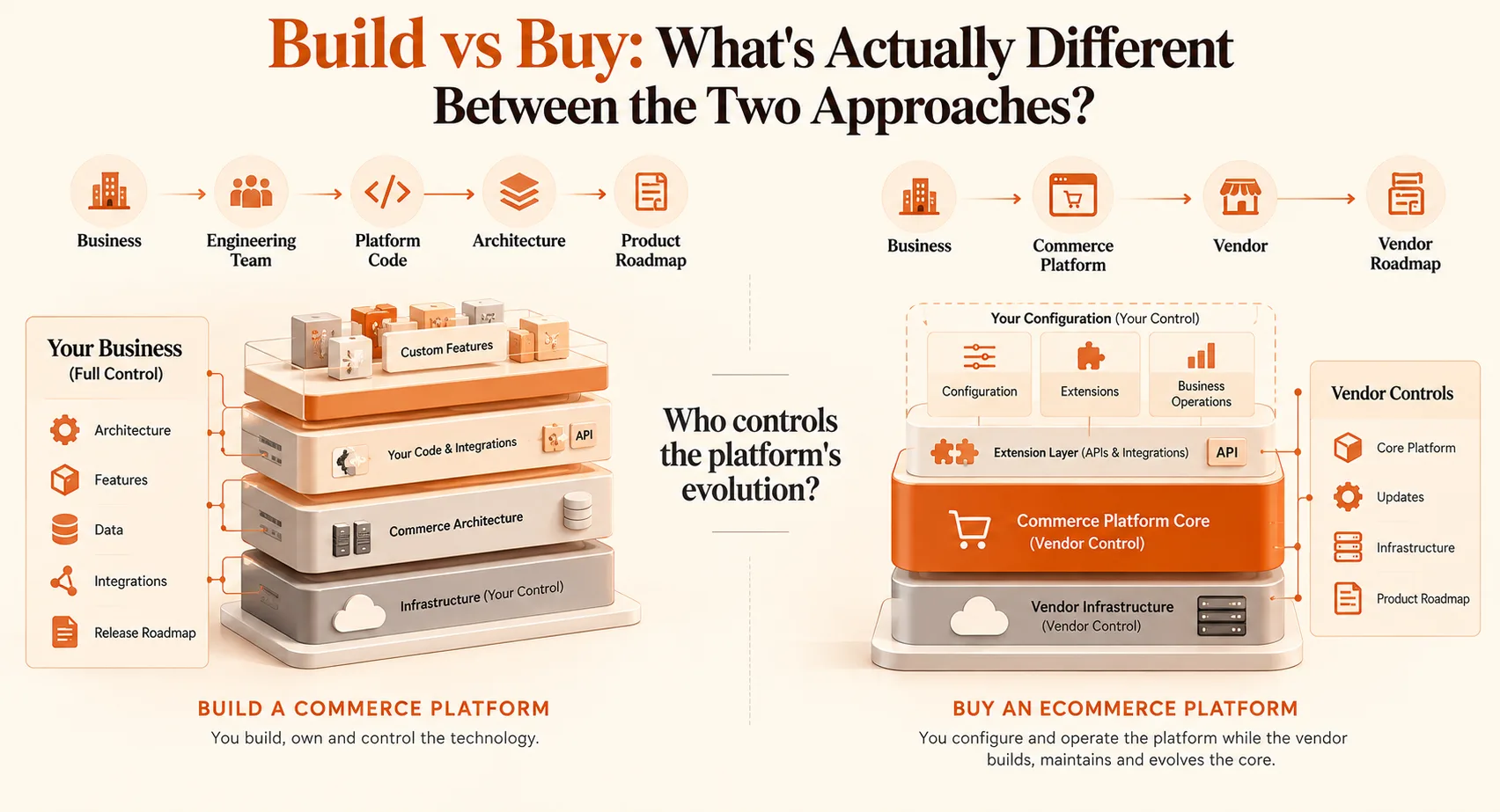
The surface-level difference is speed and cost. The real difference is who controls the platform’s evolution.
When you buy, the vendor’s product roadmap becomes your roadmap. If they decide to redesign checkout, change their API structure, or discontinue a feature, you adapt. If a competitor needs a feature that’s not on their roadmap, you wait.
When you build, your team makes every decision. That flexibility is genuinely powerful, but it comes with engineering cost, maintenance overhead, and the organizational discipline to ship without external pressure.
Build vs Buy eCommerce Platform Comparison: The Factors That Actually Matter
| Factor | Build (Custom) | Buy (SaaS/Platform) |
|---|---|---|
| Time to First Sale | 6–18 months | 4–12 weeks |
| Initial Investment | $80K–$500K+ | $500–$5K/month |
| Long-Term Cost at Scale | More predictable, no per-transaction fees | Can increase 5–10x with transaction volume |
| Customization Depth | Unlimited | Constrained by platform limits |
| Vendor Lock-In Risk | None | High, data portability often difficult |
| Scalability | Designed to your spec | Capped by platform tiers |
| Security Ownership | You control everything | Shared model with vendor |
| Integration Flexibility | Full API control | Depends on platform ecosystem |
| Maintenance Burden | High, requires ongoing dev resources | Low, vendor-managed |
| Feature Velocity | Tied to your team’s capacity | Tied to vendor’s roadmap |
| Multi-Vendor Support | Custom-built to your model | Often limited or expensive add-on |
| Best Fit | Complex marketplace models, enterprise-scale commerce | MVPs, validation, simpler commerce models |
When Does Buying eC(or Adopting a Platform) Make More Sense?
Buying is the right answer when your business model is straightforward enough that the platform’s opinions mostly match your own and when time-to-market and development bandwidth are real constraints.
Specific signals that point toward buying:
- You’re in validation mode and need to test demand before committing to custom infrastructure
- Your team has limited engineering capacity and can’t maintain a custom platform sustainably
- Your business model aligns reasonably well with the platform’s assumptions (standard product catalog, fixed commission rates, common payment flows)
- You need to move fast a product launch window, a seasonal opportunity, a partnership deadline
- Your differentiation is in merchandising, marketing, or category expertise, not in platform technology
SaaS platforms are genuinely excellent for these cases. The mistake is assuming that the answer that’s right for launch will remain right at scale. Build that reassessment into your roadmap before you’re forced into it.
When Does Custom eCommerce Platform Development Make More Sense?
Building is the right answer when the gap between “what the platform does” and “what your business needs” is large enough that you’d spend years closing it through workarounds.
Specific signals that point toward building:
- Your commission or pricing model doesn’t fit any existing template (dynamic pricing by vendor tier, time-based commission, category-specific rules)
- You operate in a regulated industry (healthcare, financial products, age-restricted goods) with compliance requirements that off-the-shelf platforms don’t cover
- You’re building a multi-sided marketplace with complex vendor workflows, approvals, performance scoring, automated payouts, dispute resolution
- You have significant transaction volume where per-transaction fees on SaaS platforms create material cost (typically above $5M GMV annually)
- Competitive differentiation depends on UX, or experience features the platform won’t let you build
Building doesn’t have to mean starting from zero. Many teams build on top of open-source commerce frameworks (Medusa, Saleor, Spree) or use headless architectures that let them own the business logic while using pre-built infrastructure for payments and catalog.
How Much Does eCommerce Platform Development Cost?
eCommerce platform costs vary widely based on scope, complexity, and approach, and no single accurate number applies across businesses. That said, it helps to understand the broad cost bands typically associated with each approach, treated as illustrative starting points rather than fixed pricing.
| Marketplace Complexity | Typical Features & Functionality | Estimated Development Cost |
|---|---|---|
| Basic Marketplace (MVP) | User and seller registration, product listings, basic search, order management, single payment gateway, and admin panel | $20,000 – $40,000 |
| Medium-Complexity Marketplace | Multi-vendor capabilities, commission management, advanced search and filters, ratings and reviews, multiple payment options, and basic reporting | $40,000 – $80,000 |
| Advanced Marketplace | Custom business workflows, flexible commission structures, automated vendor payouts, ERP/CRM integrations, role-based access, and scalability enhancements | $80,000 – $150,000 |
| Enterprise-Grade Marketplace | AI-powered recommendations, real-time analytics, high-volume transaction processing, advanced security and compliance, custom integrations, and global scalability | $150,000+ |
*These ranges are illustrative only and vary significantly by business size, region, engineering rates, and vendor selected. Always request a scoped quote based on your specific requirements rather than relying on general benchmarks.
Factors Affecting the Cost to Build an eCommerce Platform
Whether you’re scoping a custom build, a heavily customized SaaS implementation, or a hybrid architecture, the same underlying factors drive most of the cost variance.
- Feature Complexity: Basic shopping and checkout features cost less than advanced pricing engines, subscriptions, personalization, or complex workflows.
- Catalog Size and Structure: Large catalogs with multiple attributes, variants, categories, and pricing rules require more development and testing.
- Integrations: Connecting ERP, CRM, PIM, OMS, payment gateways, or legacy systems can significantly increase development effort, especially when APIs are limited.
- Design and User Experience: A standard storefront is generally less expensive than a fully customized, responsive, and highly interactive customer experience.
- Multi-Store and Global Requirements: Multiple brands, regions, currencies, languages, tax rules, and storefronts add complexity to development and ongoing maintenance.
- Security, Infrastructure, and Maintenance: Hosting, scalability, security controls, compliance requirements, monitoring, updates, and post-launch support all contribute to the total cost.
How to Choose the Right Approach between Buy vs. Build for Your Business?
Work through these questions before committing to either path:
How differentiated is your commerce model?
If your pricing logic, vendor workflows, or checkout experience needs to be genuinely unique, that’s a build signal. If you’re selling products in a standard format, that’s a buy signal.
What’s your realistic timeline to revenue?
Custom builds take time. If your runway, your partnership agreements, or your market window requires revenue within 3–4 months, buying is almost certainly the right starting point.
What does this platform look like at 5x your current size?
Model the costs and constraints at scale. Per-transaction SaaS fees that are negligible today can become your largest operating expense at $10M GMV. Custom builds that seem expensive upfront can be significantly cheaper over a 5-year horizon.
Who maintains this after launch?
Custom platforms require engineering resources for ongoing development, security patching, and infrastructure management. Without a sustainable plan, you’ll accumulate technical debt quickly.
What’s your vendor lock-in tolerance?
If switching platforms would be operationally catastrophic (all your seller data, product catalog, and order history lives on someone else’s infrastructure with limited export options), that’s a risk worth pricing in before you sign.
Why SPXCommerce Is Built for This Exact Problem?
SPXCommerce bridges the gap between building from scratch and buying a rigid SaaS platform. It provides enterprise-grade commerce infrastructure while giving businesses flexibility to configure their workflows, integrations, and customer experiences.
For marketplace operators, its multi-vendor marketplace platform supports seller onboarding, commission management, payouts, and vendor performance tracking. For B2B and B2C businesses, its headless eCommerce platform provides storefront flexibility through a React-based frontend, while the commerce engine manages catalogs, orders, and API-driven integrations.
SPXCommerce also offers ProactiveAI for conversational analytics, demand forecasting, and inventory optimization.
Key capabilities include 24-hour setup, ISO 27001:2022-certified infrastructure, microservices architecture, native integrations with major payment and logistics providers, and transparent pricing without per-transaction fees.
This approach helps businesses launch faster without sacrificing the flexibility needed to support evolving commerce requirements. If you’re evaluating build vs. buy, SPXCommerce offers a middle path worth considering.
Final Takeaway
The build vs. buy decision isn’t about choosing one approach universally. It depends on what your business needs to own, what it can source, and how those choices support your long-term goals. Factors such as business differentiation, functional fit, time to market, engineering capability, integration complexity, TCO, data ownership, scalability, and your three-to-five-year roadmap all matter.
Instead of asking, “Should we build or buy?”, ask:
“Which commerce capabilities should we own, and which should we source from a platform?”
Evaluating capabilities individually helps create a commerce strategy that can evolve with the business rather than becoming a one-time technology decision.
SPXCommerce helps enterprise and B2B organizations evaluate flexible commerce architectures, integrate custom capabilities, and build scalable solutions aligned with their requirements.