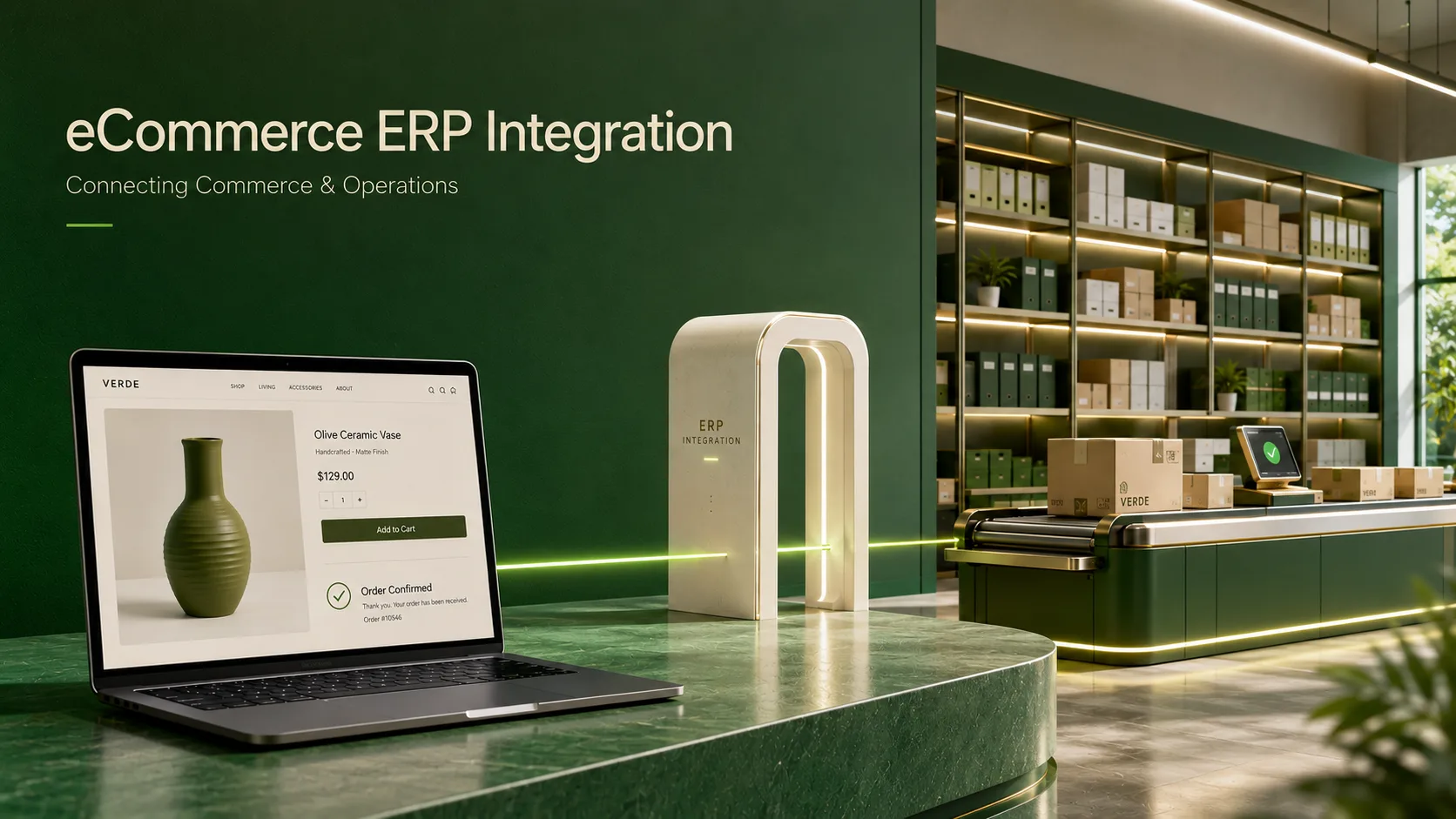
Does this sound familiar that you have an in-stock item in your eCommerce store, but the last item was delivered to the warehouse 2 days ago. A B2B customer is seeing stale pricing, and your operations team is manually re-entering website orders into ERP every morning!
These aren’t isolated issues. They occur when data across your eCommerce platform and ERP becomes inconsistent or stale. A properly engineered eCommerce ERP integration links these systems and enables seamless synchronization of orders, inventory, pricing data, customers, and fulfillment information with little or no manual effort.
Integration involves more than linking two platforms, especially for businesses with multiple sales channels, warehouses, and complex B2B workflows. It requires the right architecture, integrations, flows, and error handling.
When executed correctly, it streamlines data entry, improves data accuracy, and creates a smoother customer journey.
What Is eCommerce ERP Integration?
The integration of eCommerce with ERP is the automatic, two-way flow of data between your eCommerce website and Enterprise Resource Planning system. The systems communicate directly, eliminating the need for manual double entry of order, inventory, pricing, customer, and fulfillment information.
Think of your ERP as the operational system that tracks what you have, what it costs, and where it is going. Your eCommerce platform is what customers see. Integration is the nervous system that connects the two, and what the client sees is what the business knows.
According to the 2025 MuleSoft Connectivity Benchmark Report, 95% of enterprises with separate eCommerce and ERP systems experience at least one critical data sync failure each month, such as inventory oversells, pricing errors, and delayed fulfillment. Businesses that use integrated systems receive orders 3× faster, and manual data-entry errors are reduced by more than 70%.
The integration requirements are even more demanding for B2B commerce. ERP data must be available in the storefront accurately and in real time, to rely on for contract pricing, customer-specific catalogs, multi-warehouse stock, approval workflows, and account hierarchies. With no B2B eCommerce ERP integration, your online sales channel is essentially just a catalog with a shopping cart.
What Are the Key Components of ERP Integration Architecture?
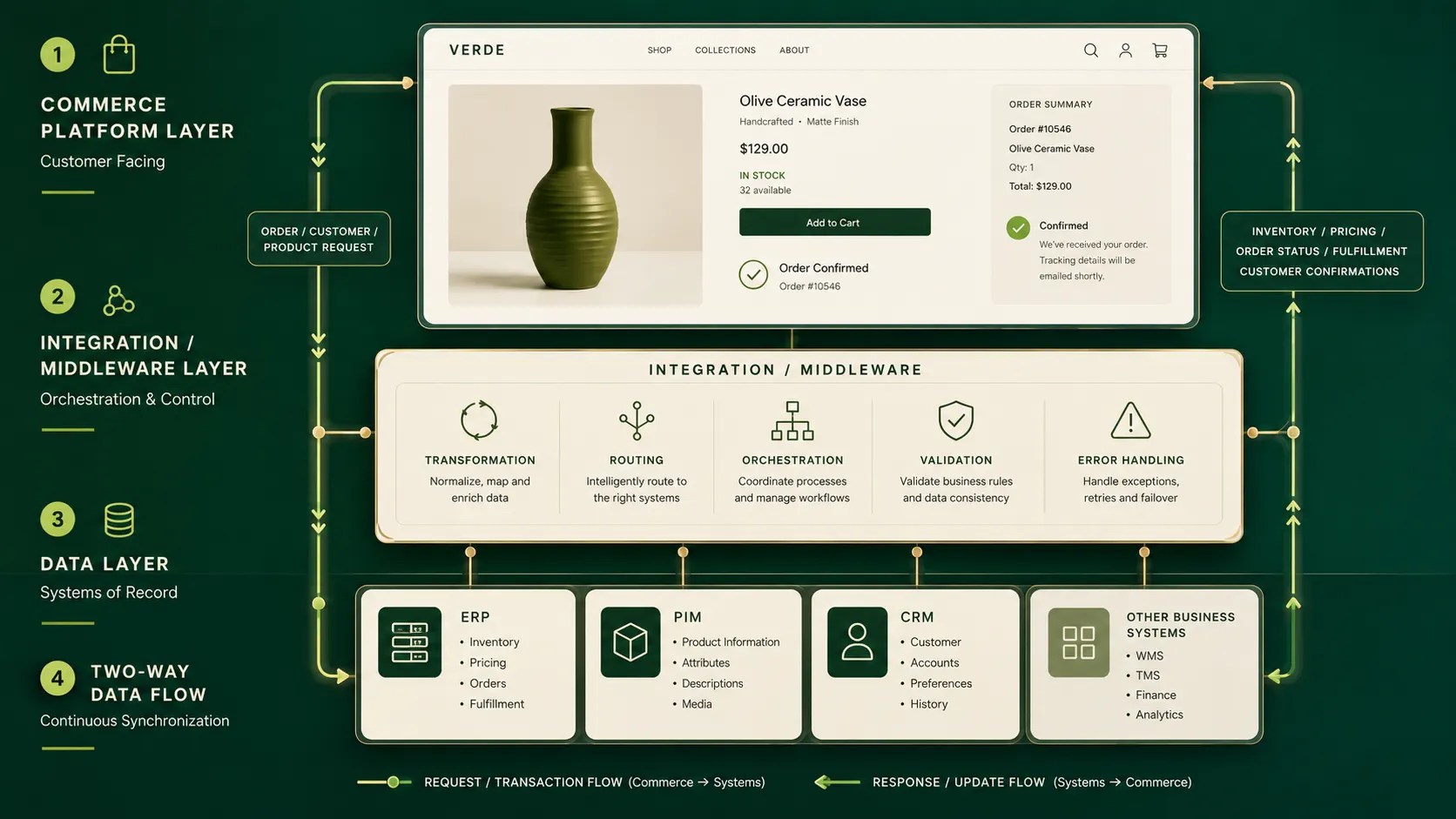
It is best to understand what an enterprise ERP integration architecture is before selecting an integration method. Every integration impacts four layers:
1. Data Layer
This specifies the location and ownership of each data type. Usually, ERP is responsible for pricing, inventory, and order information. Rich product information is stored in a PIM system, and customer relationships are stored in a CRM system. By defining source-of-truth ownership before the integration project starts, teams can prevent a common ERP integration failure in which two systems overwrite each other’s data.
2. Integration / Middleware Layer
This layer provides connectivity through an iPaaS platform such as MuleSoft, Azure Logic Apps, or Boomi, a custom API gateway, or pre-built connectors. It does data transformation, routing, retry policy, and error handling. This layer is required in an enterprise environment. One-to-one integrations between ERP and storefront quickly become brittle when you add a second warehouse, a new storefront, or a third-party logistics provider.
3. Commerce Platform Layer
To play a clean part in an integrated architecture, your eCommerce platform needs to be API-first. Headless and microservices-based platforms provide access to individual endpoints that feed product information, pricing rules, and inventory status into the platform without redeploying the entire platform.
4. Data Flow Direction
The vast majority of mature integrations are two-way. ERP moves product masters, price lists, stock levels, and order fulfillment status to the storefront. The storefront pushes new orders, customer registration, and payment confirmations back to the ERP. Most architecture decisions come down to direction and trigger logic.
What Are the Main ERP eCommerce Integration Methods?
There is no right or wrong way to implement ERP integration with an eCommerce platform. The best way to integrate ERP with eCommerce depends on your ERP system, order volume, and the number of other systems between your ERP and eCommerce.
| Method | How It Works | Best For | Watch Out For |
|---|---|---|---|
| Direct API Integration | REST or GraphQL APIs are used to connect ERP and storefront in real time. | New ERP systems (SAP S/4HANA, NetSuite, Dynamics 365) that have robust API capabilities | Tight coupling – any ERP upgrade can disrupt integration. |
| Pre-built Connectors | Module(s) supplied by vendor that connect ERP fields to storefront fields | Quickest time-to-value with common ERP/platform combinations | Minimal customization options; may be behind ERP version changes. |
| Middleware / iPaaS | An integration platform sits between the ERP and storefront to coordinate data flows. | Multi-system environments, legacy ERPs, complex enterprise stacks | Extra platform to run; needs integration-specialist management |
| Electronic Data Interchange (EDI) | Structured document exchange with standardized formats (X12, EDIFACT) | Identifies the various scenarios and requirements of B2B supply chains. | Batch Only: Not suitable for real-time inventory or pricing. |
| Flat File / FTP Sync | Scheduled exports between systems in CSV and XML format. | Legacy ERP systems where APIs do not exist. | Not real-time; errors at scale that impact customers because of the delay in data. |
In most enterprise deployments in 2026, the answer will be iPaaS + API: the ERP will sit behind a middleware layer that orchestrates, transforms, and retries all communication, and the eCommerce layer will communicate with it via clean, REST-based APIs. This makes it possible to keep the storefront independent of ERP version cycles and integrate new channels without starting the build from scratch.
What Are the Most Common ERP eCommerce Integration Challenges?
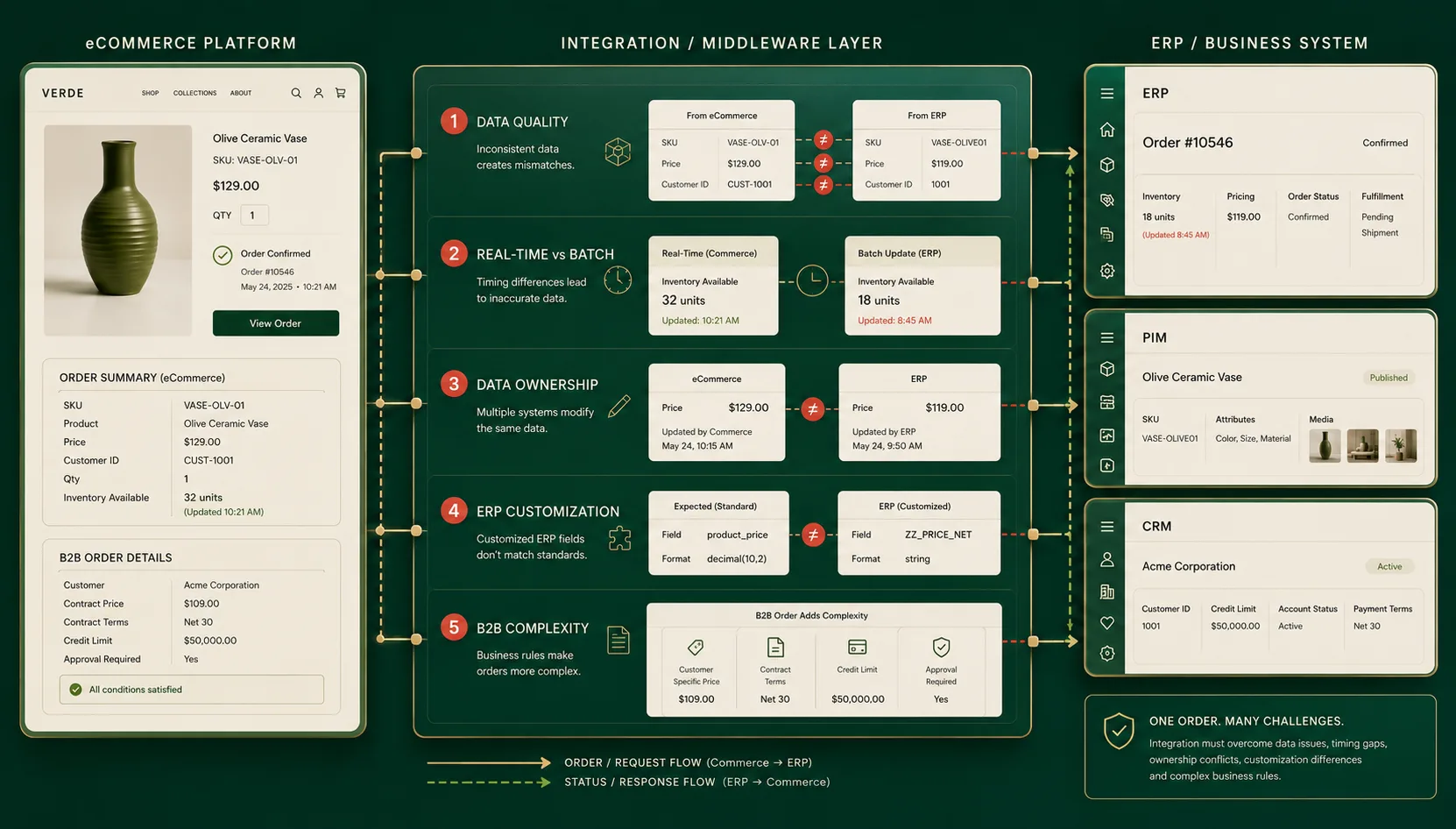
Integration projects can fail in predictable ways when teams overlook data quality, architecture, ownership, or operational requirements. Let’s look at some of the obstacles even the most experienced enterprise teams encounter, and how to avoid them.
1. Data quality and consistency issues
Fast data transfer between systems doesn’t mean fast, good data transfer. The minute you integrate, problems like duplicate product records, inconsistent SKU formats, missing pricing tiers, and mismatched customer IDs hit the ground running. Preparing for go-live with a data audit is essential and can significantly reduce costly integration issues.
2. Real-Time vs. Batch Processing Conflicts
Legacy ERPs were sometimes not built to react in milliseconds as eCommerce requires. If you’re running a B2B portal with a set of pre-negotiated orders, 30-minute inventory updates are OK, but they’re a terrible idea for a high-volume B2C flash sale. One of the most challenging aspects of an ERP integration strategy is achieving the right cadence for each data type, and the architecture must also handle mixed real-time and batch flows.
3. Unclear Data Ownership
When the ERP decides to discontinue a product and the eCommerce team launches it manually, who wins? Issues like this are bound to come up and aren’t explicitly resolved in the integration logic, so whoever catches them first will fix them.
4. ERP Customizations That Break Standard Connectors
Most enterprise ERPs come with years and years of customizations added to the core software. Pre-built connectors are usually built against a vanilla ERP configuration. If reality doesn’t match, the connector fails silently, or it requires as much bespoke work as a custom integration would.
5. B2B Complexity: Pricing, Contracts, and Permissions
Simple product/order syncs work pretty well using standard integration templates. However, B2B eCommerce ERP integration includes more features: customer-specific price lists, negotiated discounts, account credit limits, approval hierarchies, and role-based catalog visibility. They are not add-ons; they are the very essence of B2B digital commerce, and each must be mapped out in the integration layer.
What Are the Core eCommerce ERP Integration Benefits?
A successful, well-designed integration, if given time to stabilize, will yield measurable business impact beyond the IT function.
| Benefit Area | What Changes | Measurable Impact |
|---|---|---|
| Order Accuracy | Orders are transferred directly from the storefront to ERP without manual re-entry. | Minimizes order mistakes by 60-80%. |
| Inventory Reliability | Real-time stock sync is designed to prevent oversells and misinformation about stock availability. | Keeps the majority of “sorry, this item is out of stock” post-purchase emails to a minimum |
| Pricing Accuracy (B2B) | Customer-specific price lists (provided from ERP) work fine for every user. | Eliminates price conflict and manual price changes |
| Fulfillment Speed | Orders are picked up and entered into the WMS/fulfillment system without waiting for a manual handoff. | Switching to higher volumes leads to much better same-day dispatch rates. |
| Customer Self-Service | Order status, order tracking, order invoice history in the storefront portal. | Saves 30-50% of support tickets for inbound “where’s my order” requests. |
| Operational Efficiency | Automated manual data sync tasks, reallocated teams to higher-value work. | Average savings: 15-25 person hours per week (ops/customer service) |
These advantages are multiplied in B2B cases. A buyer who can place repeat orders without calling a sales rep, view accurate pricing and invoices, and track shipments has a lower churn rate and reorders more often. ROI of B2B Marketplace ERP integration becomes apparent in average order frequency and customer lifetime value within the first 12-18 months after the system has been integrated.
What Are the ERP Integration Best Practices for Enterprise Teams?
They aren’t just guidelines, but they’re from the patterns that repeatedly distinguish an integration project that goes on time and on budget versus one that takes twice as long and costs twice as much.
1. Define source-of-truth ownership before writing a single line of code
All data types should have an owner, defined by where they are created and edited and by tiebreakers in case of conflict. Document this explicitly. Teams that do not take this step end up spending months post-go-live resolving data conflicts.
2. Begin with the orders and inventory, nothing else!
The best business impact is in these two flows, and the data structure is most predictable. Once they’re stable, move them over to 30 days of monitoring and then price and customer sync. Scope creep is a common reason for delayed phase-one go-lives.
3. Use middleware rather than a point-to-point connection.
Direct API connections between the ERP and the storefront are quick to create but difficult to maintain. Middleware separates the systems, retries and recovers from failures, and lets you replace or upgrade either system without rebuilding the integrations.
4. Build monitoring and alerting into the integration from day one
Silent failures are a significant risk in integrated systems. If an order doesn’t sync with the ERP, it won’t be announced or fulfilled. Create detailed logs, alerts, and dead-letter queues so teams can detect and resolve failures before they become customer-facing issues.
5. Test with real data volumes, not sample data.
Integration problems that don’t show up in 100 test orders can become serious bugs at 10,000 real orders. Test your integration layer under load before going live, using realistic volumes, particularly if you’re running seasonal promotions or B2B contract renewals during known high-volume periods.
6. Schedule ERP upgrade cycles
Your ERP will be updated, and tightly coupling integrations to a specific API version can turn major upgrades into costly migration projects. Design with version tolerance from the beginning, and use a stable internal interface for the ERP connection that incorporates upstream changes.
How Do You Choose the Right eCommerce ERP Integration Platform?
Choosing the right eCommerce platform is as important to integration success as selecting the right ERP.. Monolithic platforms (where catalog, pricing, and order processing are housed in a single codebase) are more difficult to integrate with outside systems. Each time you have to push or pull an ERP piece, you are working around it and not using it natively.
When evaluating an eCommerce ERP integration platform, these are the questions that separate genuine integration readiness from marketing claims:
- Does the platform offer a REST or GraphQL API to access all data types you want to sync with it, such as products, pricing, inventory, orders, or customers?
- Is it flexible enough to integrate with webhooks and event-driven triggers, allowing the ERP to send updates without the storefront constantly polling?
- Is it able to process mixed real-time and batch flows for orders, and batch for product catalog updates?
- Does it include built-in multi-store, multi-currency / multi-warehouse options, or only custom-added ones?
- What is the vendor’s integration ecosystem like? The pre-built connectors to SAP, NetSuite, and Dynamics 365 shave weeks off the typical implementation time.
The architectural requirements are even more stringent for marketplace-model businesses, where data from the ERP system must be synced not only to one storefront but also to other sellers and channels. SPXCommerce’s Marketplace Solutions are built on a microservices-based architecture specifically engineered to handle the data routing complexity required in multi-vendor, multi-ERP environments.
Why SPXCommerce for Your ERP Integration Strategy?
SPXCommerce is an AI-powered marketplace and eCommerce solution designed specifically for businesses that require more than just “ERP-compatible” functionality and demand deep integration with their ERP.
The microservices architecture provides separate APIs that enable orders, catalog, inventory, and pricing to be synced with ERP, without impacting other services. Paired with a headless architecture, this also isolates commerce logic from the storefront, allowing commerce backend updates without impacting the customer experience.
Its native Order Management System (OMS) synchronizes storefront orders with ERP and fulfillment systems, and its Product Information Management (PIM) adds customer-facing information to ERP product data. Marketplace businesses can use Seller Management to route and govern multi-ERP data.
This consolidated database can help drive demand forecasting, inventory optimization, and replenishment recommendations with ProactiveAI.
Conclusion
This is more than an IT project because it creates the data foundation for successful eCommerce operations. A lack of seamless data exchange between these systems can lead to delays, inaccuracies, and inefficiencies in customer orders, inventory management, pricing, and fulfillment, ultimately resulting in missed sales opportunities.
The trick is to integrate strategically. Establish clear data ownership, choose the right integration architecture, use real-time and batch integration where applicable, and build monitoring and error handling into all critical workflows. When your business expands, the integration should also be flexible enough to accommodate new channels, warehouses, marketplaces, and ERP upgrades.
Platforms like SpxCommerce offer API-driven, headless, and microservices-based solutions, ensuring enterprises have the backbone to support their complex commerce environments beyond mere connectivity.
The aim is not just to integrate your eCommerce platform with an ERP, but to build a seamless commerce ecosystem that grows alongside your business.