
You’ve separated your monolith into microservices. Deployments are quicker, teams work independently, and then it’s Black Friday. One service runs out of orders, a series of timeouts cascades through the order flow, and checkout slows to a crawl. The architecture performed well in development but failed to maintain performance under real-world traffic.
The actual challenge is that traditional performance testing approaches often fail to account for the complexity of distributed microservices architectures. It no longer tells you which service in your chain of 30 will fail first, how your message queues will perform if upstream traffic increases by a factor of 3, or whether your API gateway will actually be the limiting factor before your database fails.
But a good microservices performance testing solution addresses this by treating each service as a first-class test target, recording service-level latency, throughput, and resource consumption per service, per dependency, and across full user journeys. The result is systems that hold, fail predictably, and automatically recover.
This guide
What Is Microservices Performance Testing?
A microservices performance test evaluates the performance of individual services and their interactions under normal, peak, and stress workloads. It not only tests for a 200 OK response, but also measures latency, throughput, timeouts, resource usage, and system behavior under stress.
Performance problems can have significant monetary consequences. Every minute an IT system is down costs $15,000, according to Cisco, making the impact of distributed system failure very quick and costly.
Microservices add complexity because a single user request may involve multiple services and network calls. This is why it is essential to test the service’s capacity and end-to-end performance.
Performance testing can expose bottlenecks, slow dependencies, cascading failures, retry storms, and unanticipated degradation. Microservices architectures add to network latency and dependency management issues, according to DORA research.
The objective is to evaluate how the entire system performs under load, rather than measuring each service in isolation. A well-designed service may become a bottleneck if multiple upstream services depend on it and/or retry requests concurrently.
Why Is Microservices Performance Testing Different from Traditional Testing?
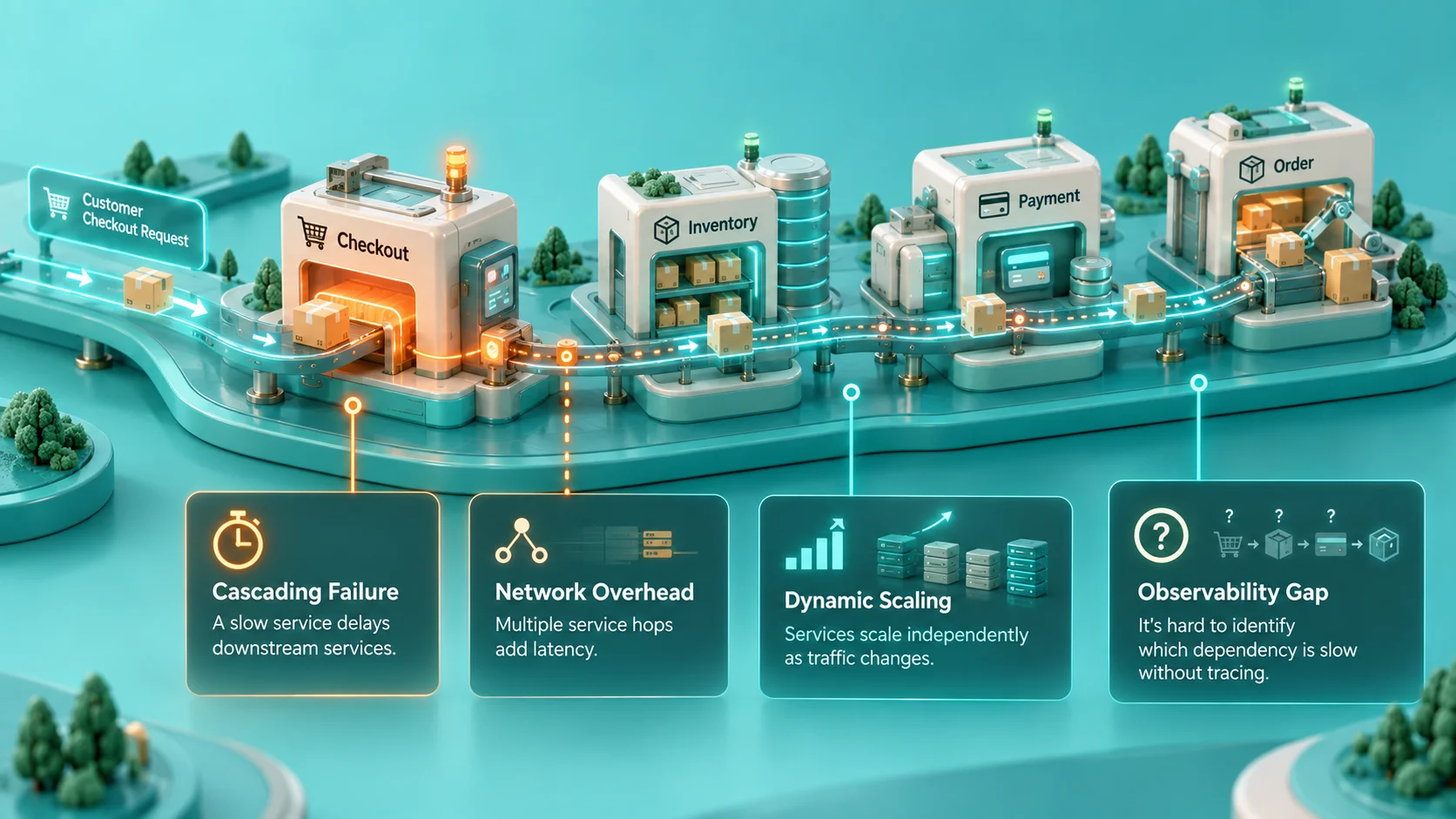
When you’re load testing a monolith, it’s relatively simple: you hit an endpoint, you look at CPU and memory on a single server, and then you adjust. With microservices, you’re in a world of distributed state, asynchronous communication, service meshes, and network latency between each layer. There are different failure modes.
- Cascading failures: A slow one service passes its delay up the synchronous chain. This cannot be discovered in traditional load tests, since only the chain is being tested, not each individual endpoint.
- Network overhead accumulates: Latency increases with each hop between services. A series of 8 internal HTTP calls, executed as a single operation, amplifies network RTT, which is not reflected when testing the services separately.
- Dynamic scaling complicates baselines: Auto-scaling is when your service count varies in response to load. A workload handled by 100 pods may behave unpredictably when autoscaling reduces capacity to 12 pods.
- Observability gaps: Without distributed tracing, you may not be able to determine whether your checkout service or the payment gateway it calls is slow.
How to Measure Microservices Performance?
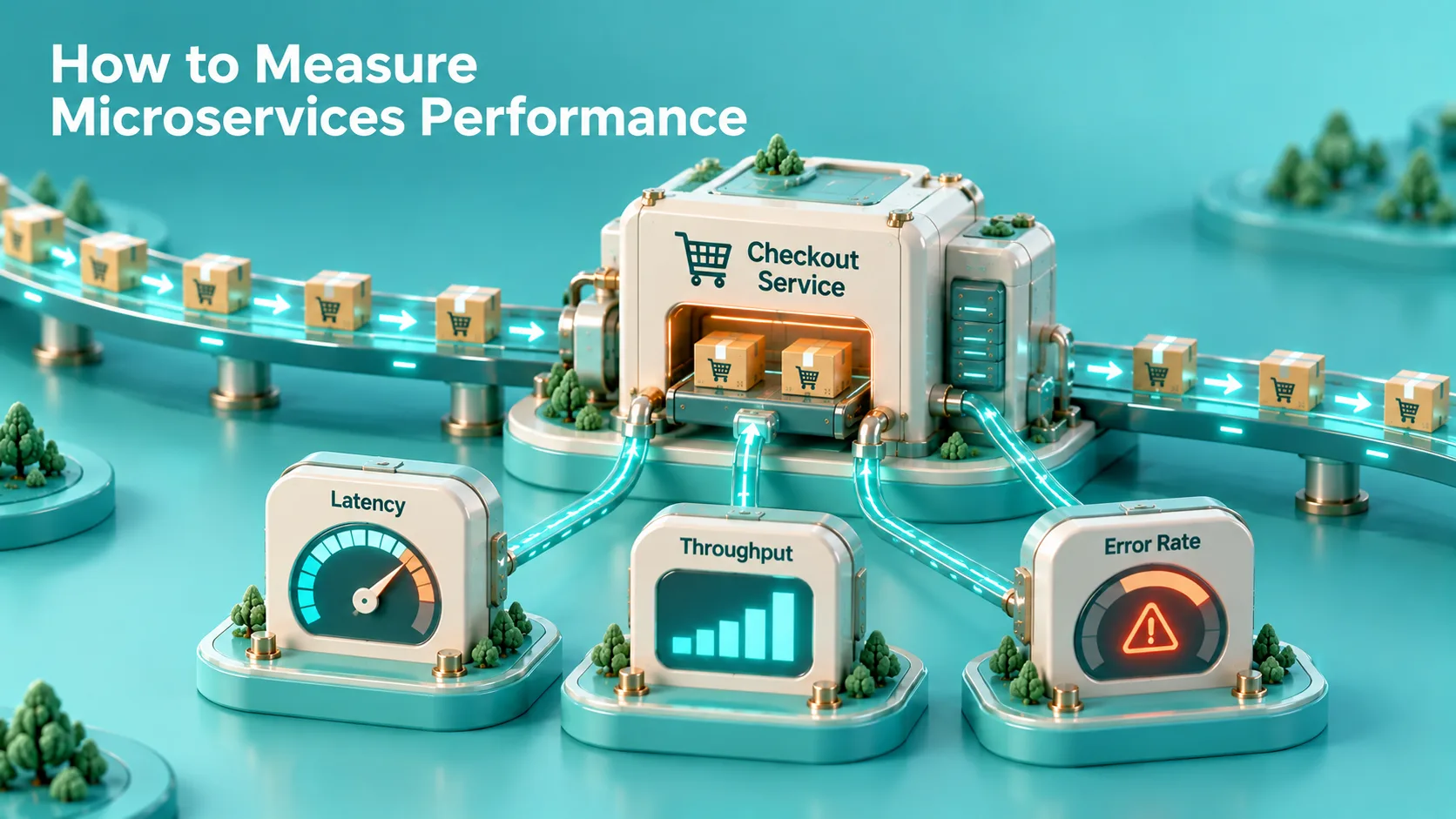
Half the battle is knowing which metrics to track. There are three levels of metrics to be tracked as part of the right performance testing strategy for microservices:
Service-Level Metrics
- Latency percentiles (P50, P95, P99): Average latency hides the tail. P99 shows what your slowest 1% of users experience, often the first sign of a bottleneck.
- Throughput (requests per second): The number of requests a service can process per second while maintaining its target latency.
- Error rate: Percentage of requests that return 5xx errors or time out under load.
- Saturation: CPU, memory, thread pool utilization – sustained usage at 70-80% is a good indication of a scaling event.
System-Level Metrics
- End-to-end transaction time: Full user-journey latency from API gateway to response.
- Service dependency depth: Number of consecutive service hops in a transaction, with each hop adding latency and another potential failure point.
- Message queue depth: In async systems, queue size indicates the lag between consumers and potential timeouts.
Resilience Metrics
- Trip rate of circuit breakers: Frequency with which circuit breakers open during operation, a direct measure of dependency fragility.
- Recovery time: The time it takes the system to recover to normal throughput after a peak or partial failure.
What Are the Main Types of Performance Tests for Microservices?
Several types of tests can be used to evaluate microservices, each with a specific purpose, such as evaluating service behavior under various traffic conditions, durations, and failure scenarios. The table below outlines the major performance tests, when to use them, and what they test.
| Test Type | What It Tests | When to Run | Scope |
|---|---|---|---|
| Load Testing | Behavior at expected peak traffic | Pre-release, pre-campaign | Service + E2E |
| Stress Testing | Breaking point where and how things fail | Quarterly or major releases | System-wide |
| Soak / Endurance Testing | Memory leaks, resource drift over time | Ongoing / staging environment | Service-level |
| Spike Testing | Sudden 10× traffic bursts (flash sales) | Pre-peak-event | API Gateway + Backend |
| Chaos / Fault Injection | Behavior when dependencies fail | Continuously in staging | System-wide |
| Contract Performance Tests | Latency compliance between services | Every build (CI) | Service-to-service |
What Is the Right Performance Testing Approach for Microservices?

A good performance testing methodology for microservices is to start small and expand. If you don’t do end-to-end path testing before creating per-service baselines, you will end up spending hours debugging a cascade when the problem was actually a slow database call.
Step 1: Establish Service Baselines
Run isolated load tests with each service behind a stub/mock before doing any system-level tests. This establishes maximum throughput and minimum latency without upstream dependencies affecting the results.
Step 2: Test Service Interactions Under Load
Now use real downstream services instead of stubs and replay the load profiles. Look for latency that exceeds the sum of individual service latencies, as the difference can reveal overhead between services.
Step 3: Run Full User-Journey Tests
Simulate realistic user behavior by testing complete flows across several services. A checkout flow that invokes the product, inventory, pricing, cart, and payment services in 6 sequential calls is very different at 5,000 concurrent users than at 50.
Step 4: Inject Failures
Use tools such as Chaos Monkey or LitmusChaos to kill instances, introduce latency, or drop packets in service-to-service communication. Test the operating speed of circuit breakers, thundering-herd issues on retries, and recovery time.
What Are the Best Microservices Performance Testing Tools?
Selecting the right performance testing tools lets teams emulate real-world load scenarios, uncover performance bottlenecks, and track microservice behavior under both load and failure conditions. The following table compares popular tools by main purpose, protocol support, CI/CD integration, and deployment model.
| Tool | Best For | Protocol Support | CI/CD Integration | Type |
|---|---|---|---|---|
| Gatling | High-concurrency load tests, realistic user flows | HTTP, WebSocket, gRPC | Native Maven/Gradle | Open Source |
| k6 | Developer-friendly scripting, CI-first | HTTP/1.1, HTTP/2, gRPC, WS | GitHub Actions, GitLab CI | Open Source |
| Apache JMeter | Complex test plans, protocol variety | HTTP, JDBC, JMS, SOAP, REST | Jenkins plugin | Open Source |
| Locust | Python-scripted, distributed testing | HTTP, custom protocols | Docker / Kubernetes | Open Source |
| Grafana k6 Cloud | Managed load testing at scale | All k6 protocols | Full CI/CD suite | SaaS |
| Jaeger / Tempo | Distributed tracing during load tests | OpenTelemetry | Grafana, Prometheus | Open Source |
| Chaos Monkey / LitmusChaos | Fault injection, resilience testing | Kubernetes-native | ArgoCD, Flux | Open Source |
| AWS Load Testing | Cloud-native distributed load generation | HTTP | AWS CodePipeline | Managed |
For most teams with microservices on Kubernetes, the first two tools to try are Gatling and k6. They both provide comprehensive per-request latency histograms, fit into CI pipelines with ease, and can simulate realistic user behavior, not just request hammers. Specifically, for marketplace platforms, Gatling’s Scala DSL makes it easy to script complex multi-service shopping flows that reflect real user behavior.
What Are the Best Practices for Microservices Performance Testing?
When it comes to microservices performance testing, there are four key elements, which include clearly defined performance goals, realistic workloads, continuous testing, and observability. These best practices help detect bottlenecks early, validate system resilience, and ensure services run reliably in real-world scenarios.
1. Test Every Build in CI
Move performance testing left and run lightweight tests for every pull request. A 5% regression in the service running on the critical checkout path is a bug, not a tuning task.
2. Use Realistic Traffic Shapes
Avoid using constant ramp-up curves. Real e-commerce traffic is sporadic and at times inactive, with geographic bursts. Use realistic load profiles based on recorded production traffic patterns in staging.
3. Always Instrument with Distributed Tracing:
Instrument all load tests with OpenTelemetry. With traces, a P99 spike tells you something is slow; without traces, that’s the sum total of your information.
4. Define SLOs Before Testing
Define SLOs: “Payment service must respond in less than 200ms at P99/5,000 concurrent checkouts”. Without a numeric target, each test result is a data point without a pass/fail criterion.
5. Test Failure Modes, Not Just Happy Paths
What do you do when your inventory service returns a 503? Does it trigger a retry storm in payment, cause checkout requests to queue, or fail fast? Deliberate failure injection is part of performance testing and is not optional.
6. Test your API Gateway Independently
Many microservices architecture designs can be bottlenecked by API gateways. This introduces latency through rate limiting, authentication middleware, and routing logic. Test end-to-end flows after testing the gateway alone with 2× expected peak.
Why Does Performance Testing Strategy Matter Specifically for Marketplace Platforms?
A multi-vendor marketplace is more complex to run than a typical ecommerce site. You’re handling concurrent seller catalog updates, buyer search and browse, multi-party checkout flows, and real-time order routing, all at the same time, all on the same infrastructure. In this case, concurrency must be considered in the microservices performance testing strategy.
The seller sets a 60% discount, which triggers indexing, price recalculation, and a push notification to registered users. Product page requests can then increase within seconds. All those are individual microservice calls. If you don’t load-test each path and its interactions, you won’t know which path will queue first.
This is equally true for seller management systems that handle onboarding, catalog sync, and payout workflows simultaneously. All of these involve multiple services, and each must have its own load profile and SLO definition.
How SpxCommerce Approaches Performance at Scale?
Instead of a monolithic commerce platform, SpxCommerce’s marketplace platform provides independent service boundaries for catalog, pricing, checkout, and seller management, allowing each element to be performance-tested and scaled independently. The layered testing pattern outlined in this guide can be implemented at the service level without untangling a tightly coupled codebase for teams working on SpxCommerce.
The platform’s ProactiveAI layer also provides runtime performance insights and identifies anomalies in service response patterns before they manifest as visible degradation. That same real-time observability is less a forensics tool for marketplace operators managing hundreds of sellers and thousands of transactions at once, and more of a loop in performance testing.
Conclusion
Although microservices provide deployment independence and scaling flexibility, they do not come without a cost. The distributed architecture makes performance issues apparent only under load, through service chains, message queues, and network hops.
A disciplined performance testing strategy builds from service benchmarks to integration tests, then to full user-journey simulations, all instrumented with distributed tracing to separate systems that hold up on peak days from those that silently suffer until someone asks you about the cart abandonment rate.
When developing or expanding a marketplace, your architecture decisions can make performance testing in later stages a simple verification exercise or a debugging marathon that can take weeks. Platforms built with clean service boundaries, observable internals, and independently deployable components make the testing work manageable.
SpxCommerce provides composable marketplace infrastructure that helps engineering teams test, optimize, and scale individual services with greater control. Explore how it can support your marketplace with a personalized demo.